
doona
doona lite
Demo
English

doona lite

doona lite edits honk configuration through a smaller interface for beginners.

Pages: Nodes, Subscriptions, Groups, Routing, DNS. The Settings dialog edits global settings. Search finds resources, and manual nodes can be shared as links or QR codes. The demo works with sample data.

There are no traffic pages, advanced Trace tab or full configuration source editor. Routing offers Test rules to check matched rules and outbounds. See the edition comparison.
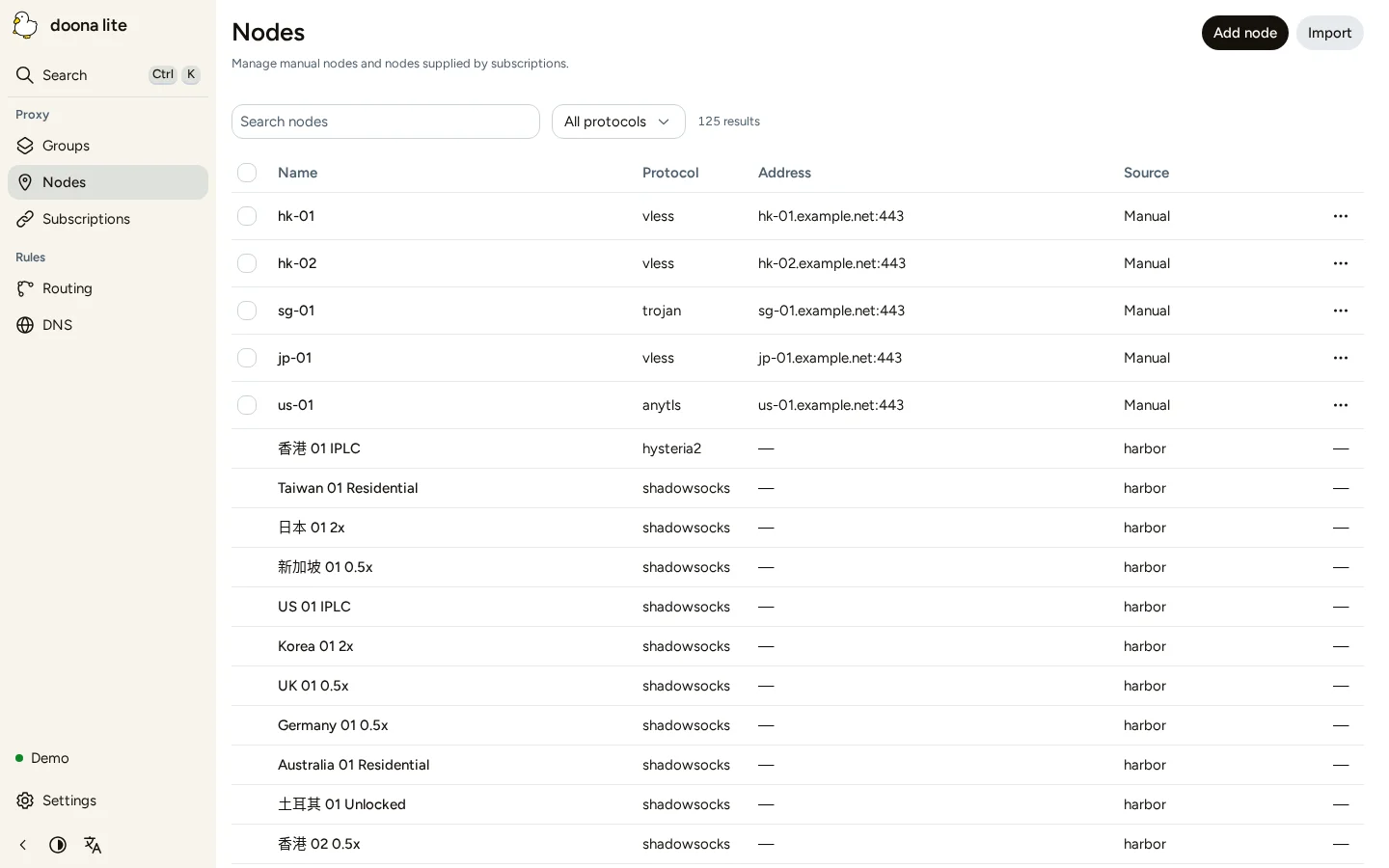
Nodes

Install doona lite

Install honk and write its minimal configuration first. In a writable working directory, download the lite archive and SHA256SUMS from the same release, verify the download, and extract it. These commands use sudo; omit it in a root shell.

doona releases

VERSION=0.1.0-beta.19
BASE=https://github.com/Zakkaus/doona/releases/download/v$VERSION
curl -fL -O "$BASE/doona-lite-${VERSION}.tar.gz" -O "$BASE/SHA256SUMS"
grep " doona-lite-${VERSION}.tar.gz\$" SHA256SUMS | sha256sum -c -
sudo mkdir -p /usr/share/doona-lite
sudo tar -xzf "doona-lite-${VERSION}.tar.gz" -C /usr/share/doona-lite
ls -l /usr/share/doona-lite/index.html

The checksum must report OK, and ls must list /usr/share/doona-lite/index.html. In the existing experimental → native_api block, set:

ui: '/usr/share/doona-lite'

Restart honk, then open its /ui/ address, for example http://192.168.1.1:9527/ui/. Continue with Connect doona lite.

Switch back to the standard edition

Set ui to the installed standard edition directory, normally /usr/share/doona (/usr/share/doona-web for Debian or Ubuntu packages), or use ui: embedded. Restart honk and reload /ui/. You can keep both directories installed; see Install and switch editions.

doona

doona documentation

English
doona documentationFor a direct-only first run, follow Quick start. Quick startStart the standard edition of doona with a direct-only honk configuration, sign in, and verify traffic from the gateway itself. Standard edition and doona liteThe standard edition manages configuration and observes traffic. Requirements Install on Debian or UbuntuInstall doona from the doona-web .deb package and honk-core from the same release on Debian, Ubuntu or another APT-based system. Install on Fedora or RHELInstall doona from its .rpm package and honk-core from the same release on Fedora, RHEL or another DNF-based system. Install on Arch LinuxInstall doona from its .pkg.tar.zst package and honk-core from the same release on Arch Linux or another pacman-based system. Install on GentooInstall doona with Portage from the repository's ebuild in a local ebuild repository, and honk-core from the same release. Install on OpenWrtInstall doona from a release package or archive and honk-core from the same release on OpenWrt 25.12. Install on other systemsInstall doona and honk-core from release archives on an x86_64 or aarch64 Linux system that meets the kernel requirements below. Installation detailsInstall honk, write its configuration, then install doona and start honk. Minimal configurationThis page writes the smallest honk configuration that starts honk and serves doona, then checks it by starting honk by hand. Service managementThis page runs honk as a systemd or OpenWrt procd service: it creates the service once, then lists the commands that start, stop, restart and reload honk and read its log. Route your first connectionContinue from Quick start, with honk running and your administrator signed in. First sign-inThis page opens doona in a browser, creates the administrator account and checks that doona shows the running honk. Interface tourUse the navigation to open a page, the top bar to search or refresh, and the page tabs to change views. Watching trafficUse Activity and System status to read engine health, and Connections, Routing log and DNS to inspect traffic. Routing, nodes and rulesPolicies manages group selection and membership. Config and settingsConfiguration reads, validates and applies honk's configuration files. Common tasksThis page covers the standard edition; for doona lite, see doona lite. FeaturesFor each feature’s prerequisites and disabled-action explanations, see Feature requirements. doona litedoona lite edits honk configuration through a smaller interface for beginners. Connect doona liteConnect doona lite to the honk native API, or open the demo without a backend. Common tasks in doona liteUse doona lite to import resources and edit honk configuration. ConfigurationUse this reference for honk's DAE settings exposed by doona, their defaults, and their application paths. What doona can changedoona changes configuration sources, runtime state, persistent geodata settings, and browser preferences through different controls. Feature requirementsFind your standard-edition feature in the table, then use its section to check prerequisites and enable it. Troubleshooting DevelopmentRead CONTRIBUTING.md before opening a pull request.